Scheduling Resources
- Training
- System Access
- Scheduling Calendar
- Scheduling Grid
- Schedule Building Processes
- Forms
- Schedule of Classes
- Course Forecasts
- Unavailable & Reduced Capacity Spaces
- Directed Studies, Special Topics & Internships
- High Impact Practices (HIP)
- No-Cost & Low-Cost
- Course Attribute Dashboard
- Final Exams
- Dashboards & Resources
- Knowledge Base
- Contacts
Training
New Users
New users will not be granted access to Banner until training is completed. Please email schedulebuilder@kennesaw.edu if you are a new user. Refresher training sessions will be offered throughout the academic year and are strongly recommended, even for seasoned schedulers. Every schedule builder and academic department administrator will be required to complete an annual training. For more information on training dates, refer to the scheduling calendar.
Training Documents
25 Live Training Materials
System Access
Scheduling Calendar
The scheduling calendars are published two years in advance. Scheduling deadlines should be strictly adhered to. All dates are subject to change.
Scheduling Grid
Colleges must schedule classes so that students can build reasonable schedules. On-grid scheduling maximizes room utilization and reduces student scheduling conflicts. The scheduling grid patterns are officially approved by the Cabinet/Provost.
Every effort should be made to schedule classes on grid. In the event an exception is needed, please complete the appropriate form below. Please note that you must provide sufficient justification for the request. Reasons such as "we have always done it this way" will not be considered or approved.
Requests will be reviewed once a month and the requestor will be notified of that decision.
Schedule Building Processes
Academic department administrators and support staff whose role it is to assist in building the schedule of classes should familiarize themselves with the schedule building processes.
- Departments should review each course after the course schedule has been published to ensure the course is accurate before the first day of classes for the course.
- Departments will be able to manage the maximum seat limit as well as the assignment of faculty to course sections using KSU CONNECT and the Department Chair menu for all courses EXCEPT those in blocks. Block sections should never be managed using KSU CONNECT and changes must go through the Director of Academic Course Scheduling. To receive access to the Department Chair menu, the department chair must email service@kennesaw.edu to request access setup.
Forms
Departments should use the Course Modification Request Form to request course modifications once schedule building has closed. Course modifications will NOT be accepted past the Friday before the first day of the class for the semester and/or part of the term of the request.
Departments should use the Course Add Request Form to request new course creations once schedule building has closed. Course adds will NOT be accepted past the add/drop deadline for the semester of the request.
Schedule of Classes
Course Forecasts
Unavailable Spaces
The following classroom spaces are offline effective Fall 2025.
- Engineering Technology Center Q 206
- Convocation Center 2015
- Atrium Building J 1227
- Atrium Building J 2039 (permanently offline)
- English Building 222 (permanently offline)
The following classroom spaces are offline effective Spring 2026.
- Atrium Building J 1224
- Design 2 Building
The following classroom spaces will be permanently offline effective Summer 2026. These spaces are being converted to larger classrooms.
- Engineering Technology Center 310, 311, 314, 315
- Atrium 1216, 1220, 1222
- Architecture 175, 176
The following classroom spaces will be temporarily offline for Summer 2026 due to orientation.
- CC 2008
Spaces Going Back Online
- None at this time
Reduced Capacity Spaces
The following classroom spaces have had a recent reduction in seat capacity.
- KSU Center 460 (30)
- KSU Center 462 (30)
- KSU Center 464 (30)
Directed Studies, Special Topics & Internships
Directed Study Course Proposals
Special Topics Course Proposals
Internships/Co-Ops Course Proposals
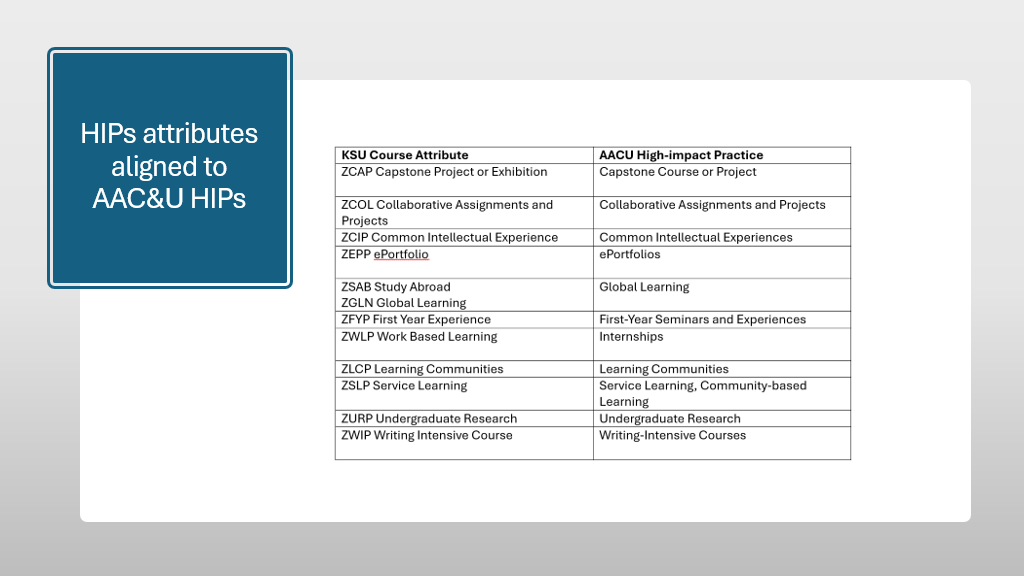
High Impact Practices (HIP)
Additional information on High Impact Practices are available
No-Cost & Low-Cost
Course Attribute Dashboard
The Course Attribute Dashboard allows departments to designate sections for the following:
- High Impact Practices (HIPS)
- No-Cost/Low-Cost
- Proctored Exam Fees
Additional information on requesting access to and using the Course Attribute Dashboard is available.
Final Exams
Dashboards & Resources
Knowledge Base
Contacts