


Faculty & Staff

Career Advising Referrals
You see students every day, which means you're often the first to notice when one could use a little career direction. Faculty and staff at Kennesaw State University can submit a support notification in KSU Navigate (EAB Navigate360) to refer any student to the Department of Career Planning and Development for one-on-one career advising.
Whether a student is choosing a major, building their first resume, searching for an internship, preparing for graduate school, or working to earn academic credit for an internship or co-op, a referral connects them with a career advisor who can help them take their next step. It takes about two minutes, and our team handles the outreach from there.
-
Step 1: Log into EAB Navigate
- Go to the EAB Navigate login page: KSU Navigate
- Enter your KSU credentials (NetID and password).
-
Step 2: Submit a Support Notification (Referral)
- Click the "Issue a Support Notification" button (usually found in the top right corner).
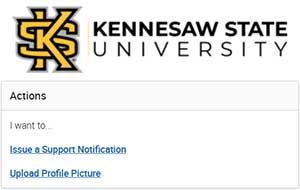
- Alternatively, you may use the search bar at the top of the page to enter the
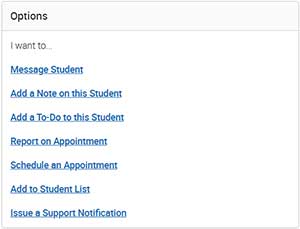
student’s name or KSU ID. Click on the student’s name to open their profile.
-
Step 3: Select Support Notification
- On either the home screen or student’s profile, click the "Issue a Support Notification" button (found in the right menu).
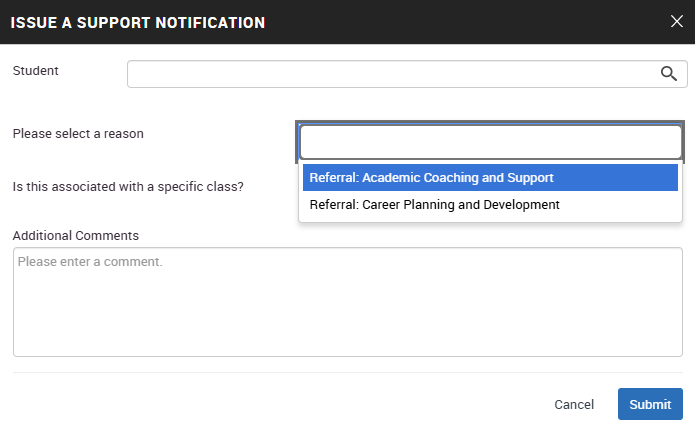
- If the support notification is submitted from the home screen, please enter the student’s name or ID. If the support notification was initiated from the student’s profile, this information will be prefilled.
- In the Support Notification Reasons dropdown, select Career Planning and Development.
- Provide Additional Details (optional)
- In the Comments section, include relevant details about the student's situation (e.g., challenges they are facing, specific concerns, or recommendations). This is a helpful but optional step.
-
Step 4: Submit the Support Notification
- Click Submit to finalize the referral.
- Career Planning and Development will automatically receive the notification.